


TL,DR:
- Compromised passwords and session cookies harvested by infostealer malware pose a severe threat because criminals load this data into antidetect browsers to bypass MFA and execute invisible account takeovers. This sophisticated impersonation can lead to devastating business impacts, including unauthorized network access, data breaches, and significant financial fraud.
- As an immediate action, security teams must monitor for behavioral anomalies like impossible travel and leverage proactive threat intelligence to identify and invalidate compromised credentials before they are weaponized.
- To prevent future password compromises and session hijacking, organizations should enforce strict session management policies, implement short-lived tokens, and proactively identify and secure accounts belonging to malware-infected users.
Antidetect browsers mask a user’s digital fingerprint, allowing one person to appear as many different users from various devices. While they have legitimate uses, criminals exploit them with stolen data to impersonate victims and bypass security like MFA. Understanding how these tools are weaponized is critical for preventing account takeover fraud.
What are antidetect browsers?
Antidetect browsers are specialized applications, often built on open-source browser cores like Chromium. They are designed to manage and modify a user’s browser fingerprint. This allows a user to appear as many distinct individuals from different devices and locations by creating separate, isolated browser profiles.
How antidetect browsers work
Anti-fraud systems use ‘browser fingerprinting’ to identify users based on unique device and browser settings. Antidetect browsers defeat this by spoofing these parameters to mimic a legitimate user’s device. This makes their fraudulent activity appear genuine.
Key spoofed parameters include:
- User Agent
- Operating System
- Screen Resolution & Fonts
- Timezone & Language
- WebGL Rendering & Canvas Fingerprint
Legitimate use cases for antidetect browsers
While frequently used in cybercrime, antidetect browsers were created for legitimate purposes and are used legally across various industries. Common use cases include:
- Digital Marketing: Managing multiple social media or advertising accounts without being linked and banned.
- Web Scraping: Gathering data for market research or competitive analysis without being blocked.
- Ad Verification: Checking how ads are displayed in different geographic locations.
- Privacy Protection: Enhancing personal anonymity by preventing tracking across websites.
Popular anti-detect browsers: What security teams should know
While the underground has its own specialized tools, many criminals simply leverage popular, commercially available antidetect browsers. Security teams should be aware of these mainstream tools, as they are often used in conjunction with stolen credentials. Common examples include Multilogin, GoLogin, AdsPower, and Kameleo.
The presence of these browsers in an environment isn’t inherently malicious. However, it can be a strong signal of account takeover risk when combined with other indicators like residential proxy usage or logins from known infected devices.
How criminals exploit anti-detect browsers for account takeover
Bot marketplaces and stolen digital identities
The criminal use of antidetect browsers hinges on obtaining stolen digital identities from bot marketplaces. Criminals buy and sell logs from infostealer malware like RedLine and Vidar. These logs contain everything needed for impersonation, including passwords and session cookies.
Prominent marketplaces include Russian Market and 2easy. The infamous Genesis Market was seized by the FBI in April 2023, but other markets quickly filled the void.
These platforms sell complete victim profiles for as little as $5 to $10. They provide all the data needed to impersonate a victim using an antidetect browser.
A classic example was the June 2021 breach of Electronic Arts, where an attacker reportedly paid $10 on Genesis Market for a stolen session cookie. This allowed them to impersonate an employee and gain access to the company’s network.
Why are criminals so interested in session cookies?
Device or session cookies are often used by online sites to remember a legitimate user’s device or browser. Especially on financial and ecommerce sites that require MFA every time the account is accessed from a new device, there’s an option to “remember this device” so that the user isn’t hassled each time for a MFA prompt.
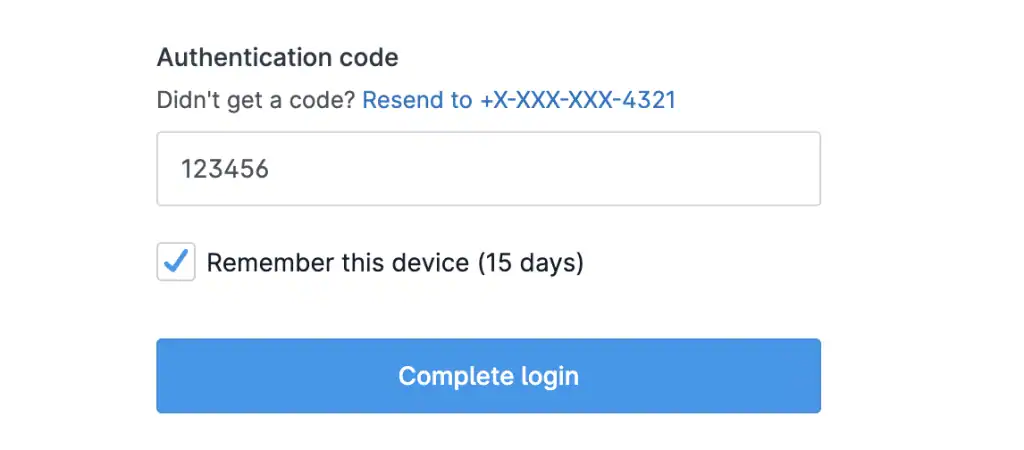
Figure 2: MFA prompt example
Criminals know the value of these cookies, and if they’re stolen from an infected user, they can be used to impersonate that user’s trusted device and bypass MFA altogether. In some cases, if the session cookies are still active, a criminal might not even be prompted to log in at all, keeping it invisible to the user that their device is infected.
Antidetect browsers used in criminal operations
Beyond mainstream tools, criminals also use browsers designed specifically for underground activities. These tools often have features tailored for stealth and fraud.
|
Browser
|
Base
|
Key Feature
|
Criminal Association
|
|---|---|---|---|
|
Genesium
|
Chromium
|
Direct integration with Genesis Market data
|
Provided by the seized Genesis Market
|
|
Linken Sphere
|
Chromium
|
"Off-the-record" mode, advanced spoofing
|
Marketed on major cybercrime forums
|
|
Fraudfox
|
VM-based
|
Uses a full virtual machine for isolation
|
Touts features for enhanced anonymity in fraud
|
|
ANTbrowser
|
Firefox
|
Leverages Firefox's engine for diversity
|
Another popular choice in underground communities
|
The role of proxies in antidetect browser operations
An antidetect browser alone is not enough to defeat modern fraud detection. To complete the impersonation, an attacker’s IP address must match the victim’s general geographic location. This is where proxies are essential.
Criminals use residential or mobile proxies to appear legitimate and consistent with the stolen fingerprint. Bot marketplace logs often include location data, allowing attackers to purchase a matching proxy and complete the disguise.
How to detect antidetect browser use in your environment
Detecting antidetect browsers is difficult by design, but not impossible. Security teams can look for a combination of indicators:
- Impossible Travel: A user session originating from one continent, followed minutes later by a login from another.
- Session Anomalies: A session cookie being used from a different IP address or with a mismatched user agent than the one it was issued to.
- Behavioral Analytics: User activity that deviates from established patterns, even if the device fingerprint appears valid.
Protecting against antidetect browser-based attacks
Session hijacking prevention strategies
Enterprises must adopt a multi-layered defense to combat session hijacking. Key strategies include proactive threat intelligence and strict session management policies. This approach helps identify threats before they result in a breach.
Consider these defensive actions:
- Proactive Threat Intelligence: Gain visibility into stolen session cookies circulating in the criminal underground.
- Strict Cookie Policies: Implement short-lived session tokens and enforce re-authentication for critical actions.
- Post-Infection Mitigation: Identify which of your users have been infected with infostealer malware to proactively secure their accounts.
How SpyCloud Session Identity Protection works
SpyCloud provides a proactive defense by giving enterprises visibility into compromised assets from the criminal underground. Our Session Identity Protection solution provides early warning of malware-infected consumers. This helps you stop session hijacking from trusted devices.
Identify infected consumers before fraud occurs with SpyCloud
FAQs
The browsers themselves are legal tools. They become illegal when used with stolen data to commit fraud or other crimes.
They bypass MFA by loading a stolen session cookie from a victim’s “trusted device,” which tricks a website into thinking it’s the legitimate user logging in.
A VPN only hides your IP address, while an antidetect browser spoofs your entire digital fingerprint, including hundreds of device and browser settings.
Criminals buy stolen data from bot marketplaces, which is harvested from victim devices using infostealer malware.
Direct detection is difficult, but organizations can identify indicators like impossible travel or by using threat intelligence to find the stolen cookies before they are used.