
Key takeaways:
- Device code phishing is the latest threat to watch. It exploits a legitimate OAuth flow, tricking the victim into entering a device code that then passes their active session cookie and refresh token to the attacker.
- MFA is not a comprehensive defense. Active sessions are the attack surface. If the victim is already logged into an app (for example, Microsoft 365, which many workers are for most of the day), entering the attacker's device code requires zero re-authentication. The token goes to the attacker; the user sees nothing unusual.
- A password reset won't stop the attack. Most refresh tokens stay valid up to 90 days by default and survive password changes. The only real remediation is explicit token revocation, which many orgs don't have the visibility to know to do in the first place, and most standard IR playbooks don’t yet account for.
- Additionally worthy of note: AI has compressed the post-compromise timeline. What used to require hours of manual mailbox review (finding live invoice threads, drafting BEC replies in the victim's voice) now takes actors minutes. The window between token theft and follow-on attacks is shrinking fast.
And it’s no wonder – we’re seeing cyberattackers use phishing emails, social media posts, video game mods, fake websites, and other channels to convince their victims to click or download malware that can silently and swiftly steal massive amounts of sensitive data.
But what makes infostealer malware such a unique threat, and how should SOC teams be thinking about adjusting traditional approaches to more fully address the risk it poses?
You can listen to their full conversation here – and then read through some added color in the commentary from our team below.
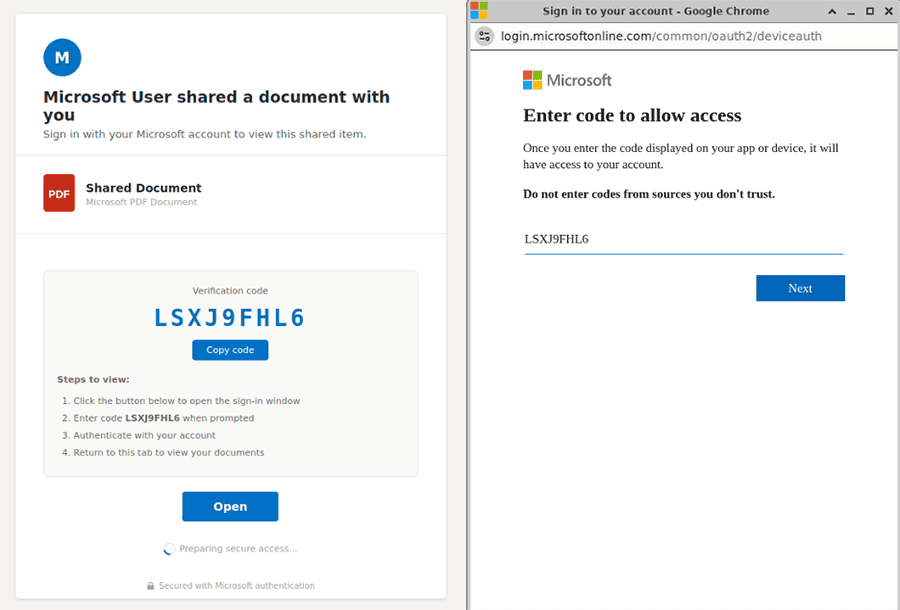
Screenshots of device code phishing lure and device code entry page.
This is the latest example in the evolution of phishing-as-a-service (Phaas) kits – a tactic called device code phishing that tricks users into entering a device code that then issues active cookies and tokens directly to the attacker’s device, bypassing MFA.
Versions of device code phishing have been around since at least 2020, and in-the-wild use linked to Russian-aligned actors was observed throughout 2024. The tactic became commonplace, however, with the release of EvilTokens in early 2026. We’re now seeing it used broadly beyond EvilTokens in other phish kits, including:
- Tycoon 2FA
- FlowerStorm
- Venom
- KaliO365
What is adversary-in-the-middle phishing?
Device code phishing is a type of adversary-in-the-middle (AiTM) phishing attack that abuses the OAuth 2.0 Device Authorization Grant to steal session tokens from cloud platforms like Microsoft 365, bypassing multi-factor authentication and granting attackers valid session access. Attackers have been observed using lures to access PDFs, voicemails, or secure file transfers that trick users into entering a device code that then issues valid cookies and tokens to an attacker’s device.
How device code phishing works: Exploiting OAuth 2.0 device flow
Device code phishing targets the legitimate OAuth 2.0 Device Authorization Grant to steal a victim’s access and refresh tokens, enabling authentication bypass by issuing tokens for an account to a device the victim never intended to authorize.
Let’s use a metaphor and think of OAuth like a hotel key card system. When you check in, the front desk doesn’t give you the master key to the building; they issue you a temporary, scoped card that only opens your room and maybe the gym. If you lose it, they deactivate it. OAuth does the same thing digitally: instead of your password (the master key), apps receive tokens (key cards) that expire and can be revoked.
The Device Authorization Grant solves one specific problem: how do you sign in on a device that lacks a keyboard? Instead of entering credentials on your smart thermostat, the device displays a short code (sometimes as a QR code) that uniquely identifies the sign-in attempt. You enter that code on a phone or laptop, complete authentication there, and the auth server issues tokens back to the original device.
That separation between the device requesting access and the device performing authentication is exactly what makes device code phishing work.
Screen recording showing how the device code phishing flow works.
How device code phishing bypasses MFA altogether
Think back to our hotel example. You probably handed over an ID at check-in to prove you are who you claim to be and that you have a valid reservation. You don’t have to provide an ID every time you re-enter your room; the presence of your room key sufficiently authenticates you.
The same is true for most web-based workflows. At sign-in you may be challenged to complete a secondary factor, but if you had to redo that every time you clicked a new link, you’d avoid clicking anything. So once an identity provider has authenticated a user, it issues a session that persists for hours or days, and subsequent actions within that session don’t trigger fresh MFA prompts.
This is the condition device code phishing relies on. If the victim already has an active Microsoft 365 session in their browser (the default state for most workers during business hours), entering the device code does not initiate a new MFA challenge. The victim sees only an authorization screen, clicks approve, and tokens are issued to whichever device requested the code. The existing session satisfies the trust requirement; no second factor is requested.
If no active session exists, the victim has to sign in fully on their own device, MFA included, before they can authorize the code. Even then, MFA isn’t technically bypassed – the victim genuinely satisfies it – but the resulting tokens still get issued to the device that originally requested the code, which in this scenario is the attacker’s. Conditional access policies that require MFA fire (or don’t) based on the victim’s normal sign-in posture, not on the device receiving the tokens.
The role of refresh tokens in granting persistent access (and why password resets don’t work)
The OAuth 2.0 Device Authorization Grant issues a refresh token alongside the access token. In Entra ID’s default configuration, this refresh token is valid for up to 90 days, can silently mint new access tokens without any user interaction, is not invalidated by password changes in many configurations, and leaves minimal log artifacts compared to interactive sign-ins.
The refresh token is closer to a self-renewing visitor badge than a key card. It keeps generating new access for as long as it’s valid, and revoking it requires an explicit action (a token revocation API call or a sign-in risk policy that triggers re-authentication). A password reset alone often won’t do it.
What attackers see – and do – with victims’ tokens: Triage, BEC, and access resale
Once the device code flow completes, the attacker holds an access token and refresh token bound to the victim’s identity, scoped to whatever permissions the client application requested. The Microsoft Office client commonly used in these flows requests broad scopes spanning Outlook, Files, Calendar, and directory read via Microsoft Graph.
The first action an actor takes is almost always automated triage. They run keyword sweeps across email and OneDrive contents, often looking for terms tied to:
- Financial workflows ("invoice," "wire," "ACH," "remit")
- Credentials ("password," "VPN," "MFA reset")
- Named cloud platforms (AWS, GCP, Okta, Snowflake)
Next, the actor plants inbox rules to silently move replies from finance contacts, IT, and security tooling into rarely-checked folders, keeping the victim and their colleagues from seeing follow-on activity. They also pull contact lists and recent correspondents for the next round of phishing, often within minutes of the initial compromise.
From here, monetization for the actor commonly splits along two paths.
- Business email compromise (BEC) targeting open invoice threads, where the actor inserts themselves into an active payment conversation and redirects funds to an attacker-controlled account.
- Access resale, where refresh tokens, session cookies, or full tenant access get listed in criminal markets. Mailbox access for high-value targets like managed service providers, executive accounts, or finance roles commands a premium.
AI’s role in speeding up device code phishing campaigns
AI has changed the economics of the labor-intensive parts of this work. Where actors previously had to read through hundreds of emails to identify monetizable threads, they can now pipe mailbox contents through LLMs to surface invoices in negotiation, credentials shared in plain text, travel schedules, or M&A discussions. We’ve also observed actors using AI to draft replies in BEC operations that match the compromised user’s writing style closely enough to fool finance teammates who’ve worked with them for years.
Post-compromise actions
Beyond initial mailbox triage, bad actors will often proceed with these follow-on actions:
- Credential harvesting from existing email and document contents, expanding access to other systems referenced by the victim.
- Device registration of attacker-controlled machines as trusted devices in the victim's tenant, often producing a Primary Refresh Token (PRT) that enables silent SSO across other corporate applications.
- Permission mapping of Entra ID roles and group memberships to identify higher-privileged accounts to compromise next.
- Impersonation of IT support or senior staff to extract additional information or access from other employees, a pattern publicly documented in the Storm-2372 campaign.
- Internal phishing to peers and external contacts, exploiting the trust signal of an authentic sender domain.
Detection and defensive considerations for enterprises
Defending against device code phishing is doable, and detecting token compromise from successful phishes is doable. Both require visibility into the right places. Here are some defense best practices:
Device code phishing prevention tips
Configure your identity provider to alert on Device Authorization Grant flows from unfamiliar IPs, devices, or geographies. Restrict which applications are permitted to use the device code grant flow at all (in Entra, this is configurable via Conditional Access). Block device code flows entirely for privileged roles and for accounts that have no legitimate need for it, which in most organizations is most accounts. Reduce refresh token lifetimes for sensitive applications, particularly those with mailbox access.
Threat hunting tips to detect compromised sessions and tokens
For hunting, look in Entra ID sign-in logs for events where authenticationProtocol = “deviceCode”, then pivot on the resulting session to find atypical Microsoft Graph API activity (large mail reads, mailbox rule creation, OneDrive enumeration) tied to the same token. If you find a session you believe is compromised, revoke the refresh token explicitly. Password resets alone will not invalidate it.
Remediation tips for SpyCloud customers
Visibility into stolen sessions is the part most organizations lack. SpyCloud customers can remediate phished user identities automatically via our Identity Guardians.
SpyCloud recaptures stolen session cookies and OAuth tokens from criminal underground sources, alerting your team to compromised identities so you can quickly remediate.
Device code phishing FAQs
Device code phishing is an adversary-in-the-middle (AiTM) attack that exploits the legitimate OAuth 2.0 Device Authorization Grant flow. Attackers trick victims into entering a device code into a webpage, which causes OAuth to issue access and refresh tokens to the attacker’s device instead of the victim’s.
Device code phishing bypasses MFA by exploiting active browser sessions. Most enterprise workers remain logged into cloud platforms like Microsoft 365 throughout the workday with an active session that has already satisfied MFA. When a victim enters the attacker-generated device code, that existing session authorizes the token issuance. Even if there is not an active session, phishing kits that support device code theft can work in an AiTM-fashion, successfully navigating the MFA prompt and stealing the session and refresh tokens anyway.
Traditional AiTM phishing uses a reverse proxy to intercept credentials and session cookies in real time as the victim logs into a spoofed page. Device code phishing is distinct because it abuses the legitimate OAuth 2.0 device flow in an already-authenticated session, making it harder to detect, convincing to victims, and increasingly difficult to defend against. The primary defense gap is token-level exposure visibility, not credential hygiene.
After obtaining tokens via device code phishing, attackers typically run automated keyword sweeps across the victim’s email and OneDrive, searching for financial data (invoices, wire instructions), stored credentials, and cloud platform access. They plant inbox rules to hide follow-on activity, harvest contact lists for future phishing, and typically pursue one of two monetization paths: business email compromise (BEC) targeting open payment threads, or access resale on criminal markets. AI tools now accelerate triage, enabling attackers to analyze entire mailboxes and draft convincing BEC replies in the victim’s writing style within minutes of compromise.
Detection requires visibility at the token and session layer. For example, in Entra ID sign-in logs, hunt for events where authenticationProtocol = “deviceCode”, then investigate associated Microsoft Graph API activity for anomalies such as large mail reads, inbox rule creation, or OneDrive enumeration. Organizations should also leverage recaptured phishing data for stolen session cookies and tokens tied to employee identities. SpyCloud detects stolen session cookies and tokens from the criminal underground, enabling security teams to terminate compromised sessions before attackers can monetize or further abuse access.
No. Password resets do not invalidate OAuth refresh tokens in most default IdP configurations. An attacker in possession of a refresh token can continue minting new access tokens silently, often for up to 90 days and even after the victim changes their password, unless the refresh token is explicitly revoked via the token revocation API or a sign-in risk policy that forces re-authentication. Effective remediation requires identifying the compromised token, revoking it directly, and reviewing all device registrations and inbox rules created during the attacker’s access window.
Keep reading